JProfiler

JProfiler

trusted
DOWNLOAD 56.96 MB
0 
1.7
This program received 4 awards
Questions & answers
Wiki
Suggest a correction

Video tutorial & screenshots

  • Main window
  • Main window
  • Main window
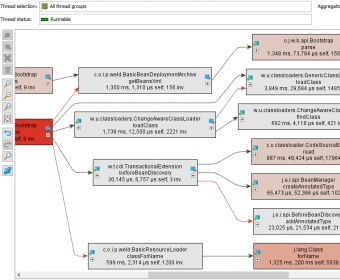
  • CPU Views

Publisher's description

JProfiler's intuitive UI helps you resolve performance bottlenecks, pin down memory leaks and understand threading issues.

Main Features:

- Ease of use.
- Database profiling for JDBC, JPA and Hibernate.
- Excellent support for Java Enterprise Edition.
- Higher level profiling data.
- Stellar analysis of memory leaks.
- Extensive QA capabilities.
- Broadest support for technologies and tools.
- Low overhead.
- The powerful CPU profiler.
- The integrated thread profiler.
This software was checked for viruses 2 months ago and was found to be clean. Click here to see antivirus report.
trusted
DOWNLOAD 56.96 MB

What's new in version 7.2

- New features:
- Biggest objects view in the heap walker: Objects in "cutoff" nodes can now be selected.
- Bundled integration for IntelliJ IDEA 12.x (the newest IDEA plugin is always available in time from the IDEA plugin manager).
- Bugs fixed:
- Platform API was partially broken (regression in 7.2).
- Monitor history and locking history graph: If a very large numbers of events were recorded, opening a snapshot could be very slow.
- Monitor history graph: For snapshots, the telemetry could not be zoomed out.
- Attaching to a 64-bit JVM from a 32-bit process did not work on Solaris and HP-UX.
- Attaching to a 64-bit JRockit JVM did not work.
- Sampling did not produce any results with Java 1.4 under some circumstances (regression in 7.0).
- Code samples in help were compressed to single lines.
- Mac OS X: IntelliJ Idea integration from JProfiler did not work.
- Fixed NPE in eclipse IDE integration.

What's new in version 7.1

-A JPA/Hibernate probe has been introduced

What's new in version 7.0

Probes. JProfiler now has a dedicated JEE & probes view section where you can record and analyze high-level data from various subsystems. There are built-in probes for:
JDBC
JMS
JNDI
Servlets
Files
Sockets
Processes
Probes can have the following views: In the time line view, the probe shows its control objects as colored bars along a time axis. Control objects are long-lived objects associated with single probe events. For example, in the JDBC probe, the control objects are the database connections. The colors on the time line bars correspond to the different states that the control object can be in.

Leave a comment


loading
.jps JProfiler snapshots
Download Software Informer Client